Reslralnts
Infotainment
Drlvlng & Operatlng
Advanced Drlver
Asslstance
Syslems{ADAS)
Rebooting Infotainment
Infolalnment
There may be a time whereyou find it necessaryto rebootthe
infotainment system (e.g., if an erroroccurs in an app). This can be
done withoutturning the othervehicle systems Off and On.
About InfotaSnment
Note.. Rebooting the infotainmentsystem does notsign out of anyapps
or delete anysaved information.
Phy$l¢al Audlo Controls
Medla and Audlo
Maps and Navlgatlon
Phone und Smart Davlcos
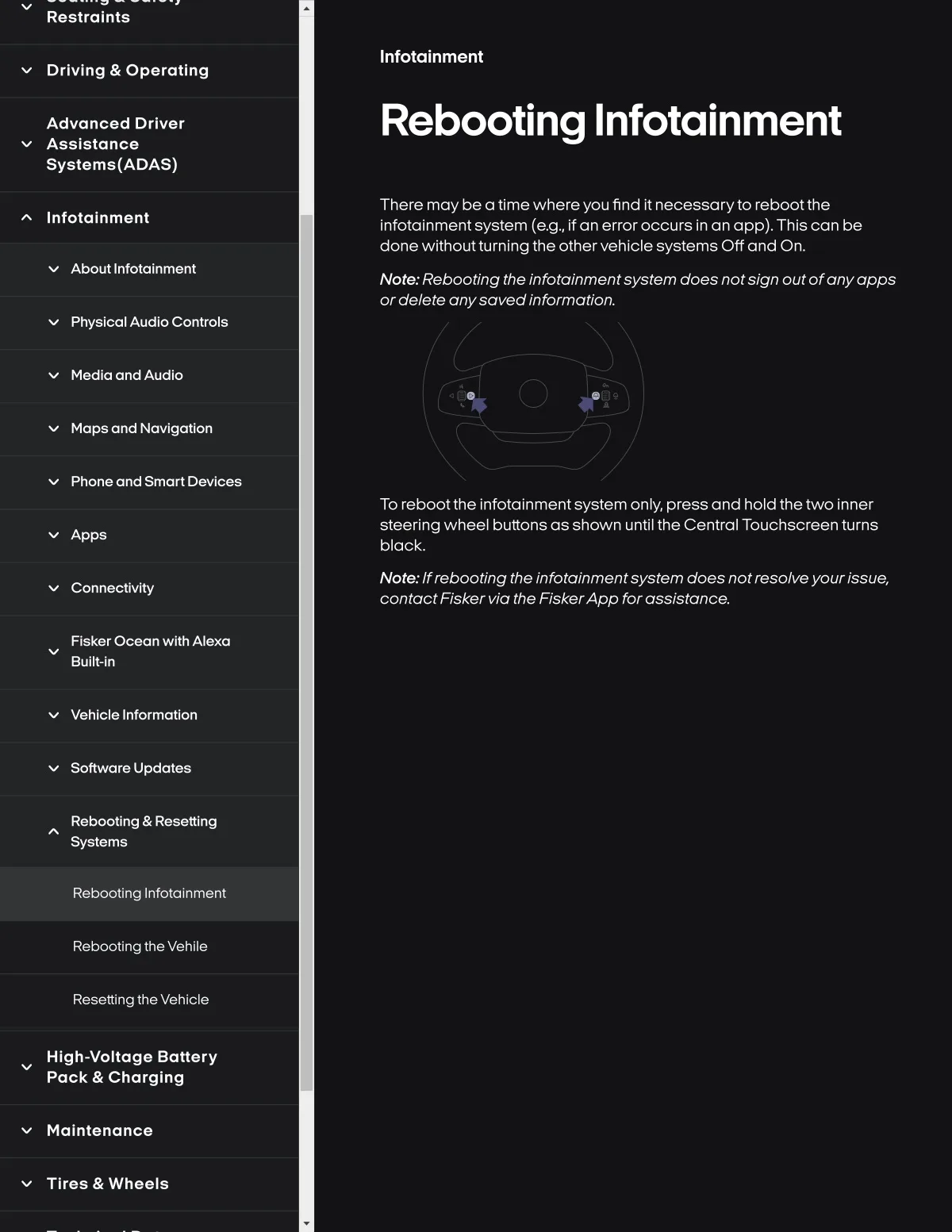
To r8bootthe infotainm8ntsyst8m only, pr8ss ond hold the two inn8r
steering wheel buttons as shown until the Central Touchscreen turns
black.
Apps
Connectlvlty
Note.. If r8booting th8 Infotalnmentsyst8m does notresolve yourissue,
contactFisker via the FiskerApp for assistanc8.
Flsker Ocean wlth Alexa
Bulli-ln
Vehlcle Informatlon
Softwar8 Update8
Rebootlng & Resettlng
Systemg
Rebooting Infotalnment
Rebooting the Vehile
Resettlng thevehlcle
Hlgh-voltage Battery
Pack & Charglng
Maintenance
Tlres & Wheals