Reslralnts
Infotainment
Drlvlng & Operatlng
Advanced Drlver
Asslstance
Syslems{ADAS)
Rebooting thevehicle
Infolalnment
In rare instances,you mayfind it necessaryto rebootyourvehicle (e.g.,
if an error occurs).This process essentiallyturnsthevehicle Off and On
without having to remove any keysfrom the area.
About InfotaSnment
Note.. Rebooting the vehicle does notdelete onysaved Information.
such as profiles or vehicle settings,
Phy$l¢al Audlo Controls
To Inltlate a vehlcle reboot..
Medla and Audlo
Pressand hold the brake pedal. Continue holding throughout
the process.
Maps and Navlgatlon
Shiftthe gear into P (Park).
Phone und Smart Davlcos
Apps
Connectlvlty
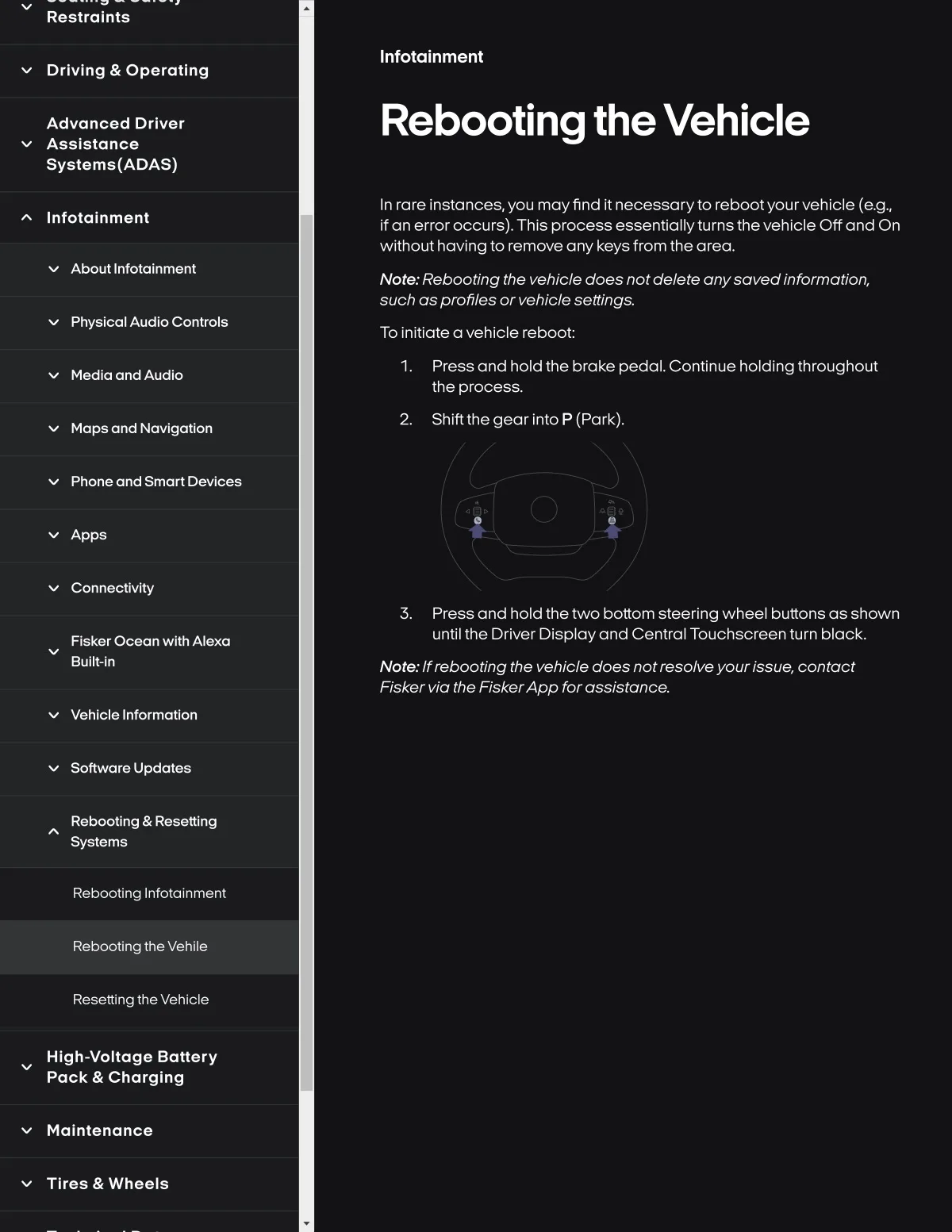
Press and hold thetwo bottom steering wheel buttons as shown
until the Driver Disployand Central Touchscreen turn black.
Flsker Ocean wlth Alexa
Bulli-ln
Note.. If rebooting the vehicle does notresolveyourissue, contact
Fisker via the FiskerApp for assistonce.
Vehlcle Informatlon
Softwar8 Update8
Rebootlng & Resettlng
Systemg
Rebooting Infotalnment
Rebooting the Vehile
Resettlng thevehlcle
Hlgh-voltage Battery
Pack & Charglng
Maintenance
Tlres & Wheals